Hover to preview
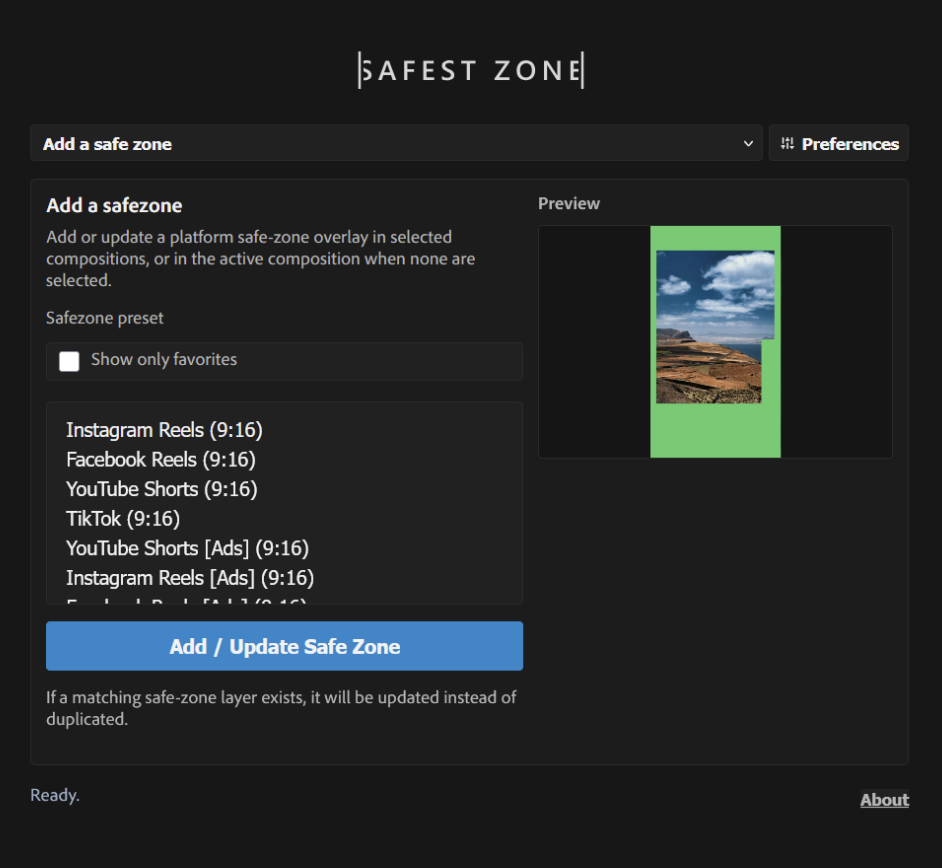
Pick, preview, add.
Browse available safe zones with a clear preview, choose the one you need, and add it directly to the selected composition.
After Effects safe zone extension
Build social videos, ads, thumbnails, and campaign variants with safe zones you can actually trust. Pick a layout, preview it, add it to your comp, or generate a whole set of safe-zone versions in just a few clicks.
What it does
Safest Zone keeps platform requirements visible while you design, animate, and prepare deliverables. It helps you stay inside the usable area for social media, advertising banners, and any custom format where text, logos, and key action must remain protected.
Built-in presets
Use ready-made safe zones for common social deliverables, then create reusable custom presets whenever a client brief needs a special format.
Need a client-specific safe zone or an uncommon format? Create custom presets and reuse them whenever the next brief asks for something special.
Feature demos
Browse available safe zones with a clear preview, choose the one you need, and add it directly to the selected composition.
Duplicate a composition into multiple safe-zone versions in a few clicks. Safest Zone creates a copy for each selected layout and applies the matching guide automatically.
Turn shape layers into reusable custom safe zones for unique client specs, unusual placements, brand templates, and one-off production requirements.
Customize color, opacity, guide-layer status, and lock state. Then update those settings across selected compositions without manually hunting through layers.
Safest Zone is made for motion designers, editors, and content teams that create vertical videos, square posts, widescreen ads, reels, shorts, stories, thumbnails, and campaign variants in Adobe After Effects. It keeps safe areas visible, repeatable, and easy to update, so important text and graphics stay clear of interface overlays and crop risks.
 aescripts.com